Contents
Principal component analysis
Background
PCA Schematic
Artificial data
No noise
With noise
PCA with n > p
Weird data
Clustering
Real spikes
Principal Component Analysis (PCA)
Background
A common use of principal component analysis (PCA) in neurophysiology is to help with spike sorting in extracellular recordings. If you use a template- or threshold-based search procedure to detect the spikes, you will end up with a series of waveforms each of which is marked by an event, and each of which contains a putative spike. The spike waveforms are likely to have quite similar, but not identical, shapes. Some of the variability is simply due to noise, but some is because the waveforms are generated by different axons. These waveforms are likely to fall into shape clusters, each of which you would interpret as containing spikes from a different axon. Principal component analysis gives you a way to optimally detect the key differences in shape that help you separate spikes into such clusters.
- Load the file PCA ground truth.
This file will be examined in detail later, but for now, just note that the lower trace shows an extracellular recording with 4 obvious spikes. The spikes are marked by 4 numbered events in channel d. The events were constructed by template matching to a typical spike (not visible in the initial view) using a very large allowed errorThis means that detected waveforms were basically similar in general shape to the template spike, but they did not have to be a close match. This enabled a variety of spike shapes to be detected., and each event encompasses the peak of the spike. There are clearly at least 2 different spike types - a large amplitude type (the first 2 spikes) and a smaller amplitude type (the last 2 spikes). So the 4 spikes originate from at least 2 different axons. However, closer examination shows that there are more subtle differences within these 2 classes. For instance, the last (4th) spike has a larger post-peak negative component than the second last (3rd) spike, even though these two are very similar in peak amplitude. Similarly, the 1st and 2nd spikes differ in their negative components, even though their peaks are very similar.

PCA is a technique that helps to distinguish between spike shapes in a way that goes beyond obvious differences such as peak amplitude. However, before showing this in action, I will give a conceptual overview of what PCA actually does, although I will not go into the mathematical detailsMainly because my maths is not up to it. of the algorithms underlying the analysis.
Here is one conceptual definition of PCA:
The central idea of principal component analysis is to reduce the dimensionality of a data set consisting of a large number of interrelated variables, while retaining as much as possible of the variation present in the data set. This is achieved by transforming to a new set of variables, the principal components (PCs), which are uncorrelated, and which are ordered so that the first few retain most of the variation present in all of the original variables. (Jolliffe, 2002).
The interrelated variables in the definition above are the spike waveformsNote that the term "interrelated" does not refer to serial correlation with each waveform, but rather the fact that all the waveforms share some general features (they all start near zero, wobble around a bit with a clear peak or trough within the wobbles, then return towards zero)., and PCA "repackages" these into another set of waveforms called basis waveformsThey are also sometimes called the Eigenvectors, loadings vectors, coefficients, or just factors. It can get confusing!. These emphasize the differences in the original set of spike waveforms, and there is no correlation between the various basis waveforms (they are orthonormal) so there is no redundant information between them. PCA also gives you a series of weighting coefficientsSometimes called scores. that tell you how much each point in each basis waveform contributes to the original spike waveform. The original spike waveforms can be recovered by summing the basis waveforms, but with each point multiplied by the appropriate weighting coefficientThe original waveform is thus a linear combination of the basis waveforms, which is why PCA is a procedure within the mathematical discipline of linear algebra..
At first sight it might seem a pointless exercise to switch waveforms from one package type to another. However, the key advantage is that the new packages (the basis waveforms) are automatically sorted in the order of information importance, where the first reflects the greatest variability in the spike waveforms i.e. the features that differ most between the waveforms (and thus are key indicators of shape difference), the second reflects the next greatest variability, and so on. PCA can also tell you how much information is contained in each basis waveform, often displayed as a list of eigenvaluesThe name derives from the mathematical procedure used to calculate them. which describe the amount of variance explained by the package. Because the basis waveforms are in order of information importance, you only have to use the first few (often just the first 3), to recover a close approximation to the original waveforms.
In spike sorting, PCA is not usually used to recover spike waveforms - in fact, the basis waveforms are often not used at all. For spike sorting, the important information is contained in the weighting coefficients, since it is the differences between these that turn the single set of basis waveforms into the multiple sets of spike waveforms. So these are what are clustered, rather than the original waveforms (and certainly not the basis waveforms, since these are all totally uncorrelated with each other and therefore don't form clusters). The important advantage is that instead of trying to cluster based on differences in the full waveforms of the detected spikes, much of which is due to noise, you try to cluster based on the differences between just the first few sets of weighting coefficients, very little of which is due to noise. This is much more likely to be successful, and that is why PCA is often used in spike sorting.
PCA Schematic
It is easy to got lost in the terminologyIt is not helped by the fact that different disciplines tend to use different naming conventons for the same components in PCA. of PCA and the dimensions of the data, so a schematic illustration might be helpful.
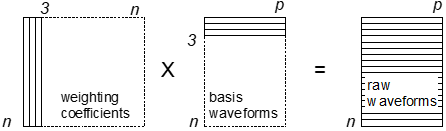
Assume that we have n spikes, each with a waveform containing p sample values. The spike waveforms can thus be described by an n x p matrix of voltage values.
The PCA produces 3 sets of numerical output values:
- The first is the set of n uncorrelated basis waveforms, each of the same length p as the original input waveforms, i.e. another n x p matrix. However, now n does not refer to the sequence number of the spike, but rather to the sequence number of the importance of that basis waveform in terms of information content, with n = 1 being the most important. Very often only the first 3 basis waveforms contain useful information, while the rest just describe the noise in the signal, in which case the actual relevant matrix would be size 3 x p.
- The second is a list of n Eigenvalues which are often expressed as a percentage that specifies the amount of the variance explained by each of the n basis waveforms. As implied by (1) above, the values tend to decline very rapidly, often with only the first 3 significantly greater than 0.
- The third is an n x n matrix of weighting coefficients. However, just as only the first few basis waveforms contain useful information, only the first few weighting coefficients are important. So if "few" is actually 3, then the relevant matrix would be size n x 3.
A close approximation to the original raw waveforms could then be reconstructed by multiplying the n x 3 coefficient matrix by the 3 x p basis waveform matrix, as illustrated below.
Analysis and Reconstruction
Let us try principal component analysis and waveform reconstruction with the 4 spikes shown above.
- Select the Event analyse: Shape classification/clustering: Principal component analyis menu command.
Two dialogs are activated. The left dialog (Principal Component Data Source) allows you to select and adjust the spike waveform data source, while the right dialog (Principal Component Analysis and Clustering) controls the analysis.
In the left Data Source dialog:
- Set the Source event channel to d.
- Set the Master trace to 2.
You should now see the waveforms of the 4 spikes superimposed on each other. The alignment is determined by the user-set Focus, and is indicated by a dashed vertical cursor. By default the focus is Positive peak which means that the focus time for each spike is the time of the most positive value within the source event marking that spike.
- Select the Negative peak and Event start options in turn just to see their effect, but then return to the Positive peak option.
- Set the Analysis Pre-focus time to -0.3 ms and the Analysis Post-focus time to 0.48 ms. This makes the Analysis region a tighter fit to the focus point.
The analysis region start and end times are marked by red and blue vertical cursors in the waveform display, and thus delimit the section of data for each spike that is actually analysed. (The times can also be set by dragging the cursors, but for this demonstration use the values above so that you get the same results as described here.) The general idea is that you should keep the analysis region as narrow as possible to exclude interspike data that are just pure membrane noise and also to reduce computational load, but keep it wide enough to include those parts of the spike waveform that distinguish different classes of spikes.
The graphical display in the Data Source dialog should now look like this:

Now we will analyse the data using facilities in the right Analysis and Clustering dialog. DataView uses the NIPALS (non-linear iterative partial leas squares) algorithm for principal component analysis. This extracts principal components one at a time up to the number requested and is relatively efficient for large numbers of events.
- Leave the Number of PCs at its default value of 3.
- Click the Calculate button and note that 4 dots appear in the 3D graph. These show the 3D coordinates of the first 3 weighting coefficients of the 4 spikes, but you can ignore the graph for now. (If you can't see the dots, increase the Point size to 8, which should make them obvious. But then set it back to 5.)
- Click the Details button to activate the resizable Results dialog.
For your convenience, the text in the Results dialog has been pasted into the 4 Spike Details worksheet in an Excel workbook that can be downloaded.
Details
There are 4 sections in the Details text. (You may want to click the dialog Expand tabs button (<>) if the column numbers don't line up with their headings.)
- This list shows the percentage of the variance explained by each of the 3 principal components, calculated from the eigenvalues of the spike data matrix. Note that the % variance explained drops with each component (although the cumulative % increases, of course). Unusually, all the variance is explained by these 3 components (the cumulative % reaches 100 at the third component). This is because there are only 4 spikes - if there were more spikes and therefore more variability, it is likely that the cumulative % would be high at the 3rd component, but would not reach 100.
- This shows the 3 weighting coefficients (WC: columns) for the 4 spikes (#event: rows). These are the values that underlie the 4 dots in the 3D graph. There is no obvious pattern to these, but this matrix is where we would look for clusters of spikes with similar coefficients, if we had more spikes. We will do that later.
- This shows a list of the 3 Basis waveforms (BW: columns), which are the eigenvectors calculated from the spike data matrix. Each row is a time bin within the waveform, and there are the same number of time bins as there within the analysis region for the spikes (14 in this case).
- This shows a list of the bin means of the raw spike data, i.e. the average waveform of the 4 spikes. The NIPALS algorithm works best if the data are "column centred", meaning that the mean value of each bin for the 4 spikes is calculated and subtracted from the spike waveform data before it is sent to the NIPALS algorithm for PC calculation. These mean values are of no interest in spike sorting, but if you want to reconstruct the original waveform by matrix multiplication of the basis waveforms and weighting coefficients, then the mean value of each bin has to be added back to the product to recover the original waveform.
Here are graphs showing some key features. The source data are available in the Excel Graphs worksheet (Note: the waveforms of the raw spikes that will be analysed can be retrieved by selecting Copy analysis data as text or Save analysis data as text from the drop-down menu of the Copy button below the trace display in the Data Source dialog.)


Reconstruction
The Spike Reconstruction Excel worksheet shows how the original raw spikes can be reconstructed from the PCA data. A fragment of that worksheet is shown below:
| A | B | C | D | E | F | G | H | I | J | K | L | M | N | O | P | |
| 1 | Scores: (Weighting Coefficients) | Basis waveforms | Mean | Reconstructed spikes | ||||||||||||
| 2 | #event | WC 1 | WC 2 | WC 3 | time bin | BW 1 | BW 2 | BW 3 | mean | rec spk 1 | rec spk 2 | rec spk 3 | rec spk 4 | |||
| 3 | 1 | -198.3887 | -1.0278 | 23.968 | 1 | 0.0447 | 0.1897 | 0.238 | -106.264 | -109.622 | -138.426 | -92.527 | -84.480 | |||
| 4 | 2 | -9.9581 | -138.2628 | -23.0596 | 2 | 0.2609 | 0.153 | 0.1161 | -122.011 | -171.145 | -148.44 | -64.455 | -104.00 | |||
| 5 | 3 | 213.6678 | -3.8339 | 20.6427 | 3 | 0.3904 | -0.0177 | 0.0066 | -65.553 | -142.827 | -67.145 | 18.067 | -70.306 | |||
| 6 | 4 | -5.321 | 143.1245 | -21.5512 | 4 | 0.271 | -0.2033 | 0.3447 | 70.1915 | 24.900 | 87.65 | 135.99 | 32.224 | |||
| 7 | 5 | -0.025 | -0.3454 | 0.5702 | 224.185 | 243.167 | 259.04 | 231.94 | 162.59 | |||||||
| ... | ... | ... | ... | ... | ... | ... | ... | ... | ||||||||
| 14 | 14 | 0.2211 | -0.1496 | -0.4478 | -118.410 | -172.853 | -89.60 | -79.838 | -131.35 | |||||||
And here are the formulae that generate the reconstructed spike values:
| L | M | N | O | ||||
| 1 | Reconstructed spikes | ||||||
| 2 | rec spk 1 | rec spk 2 | rec spk 3 | rec spk 4 | |||
| 3 | =$B$3*G3+$C$3*H3+$D$3*I3+$K3 | =$B$4*G3+$C$4*H3+$D$4*I3+$K3 | =$B$5*G3+$C$5*H3+$D$5*I3+$K3 | =$B$6*G3+$C$6*H3+$D$6*I3+$K3 | |||
| 4 | =$B$3*G4+$C$3*H4+$D$3*I4+$K4 | =$B$4*G4+$C$4*H4+$D$4*I4+$K4 | =$B$5*G4+$C$5*H4+$D$5*I4+$K4 | =$B$6*G4+$C$6*H4+$D$6*I4+$K4 | |||
| 5 | =$B$3*G5+$C$3*H5+$D$3*I5+$K5 | =$B$4*G5+$C$4*H5+$D$4*I5+$K5 | =$B$5*G5+$C$5*H5+$D$5*I5+$K5 | =$B$6*G5+$C$6*H5+$D$6*I5+$K5 | |||
| 6 | =$B$3*G6+$C$3*H6+$D$3*I6+$K6 | =$B$4*G6+$C$4*H6+$D$4*I6+$K6 | =$B$5*G6+$C$5*H6+$D$5*I6+$K6 | =$B$6*G6+$C$6*H6+$D$6*I6+$K6 | |||
| 7 | =$B$3*G7+$C$3*H7+$D$3*I7+$K7 | =$B$4*G7+$C$4*H7+$D$4*I7+$K7 | =$B$5*G7+$C$5*H7+$D$5*I7+$K7 | =$B$6*G7+$C$6*H7+$D$6*I7+$K7 | |||
| ... | ... | ... | ... | ... | |||
| 14 | =$B$3*G16+$C$3*H16+$D$3*I16+$K16 | =$B$4*G16+$C$4*H16+$D$4*I16+$K16 | =$B$5*G16+$C$5*H16+$D$5*I16+$K16 | =$B$6*G16+$C$6*H16+$D$6*I16+$K16 | |||
Consider the formulae in cells L3 and L4 that reconstruct the first 2 sample bin values in the waveform of the first spike. If WC = weighting coefficient, BW = basis waveform and AS = average spike, the formulae can be read as:
spike 1 bin 1 = WC 1 for spike 1 x BW 1 for bin 1 + WC 2 for spike 1 x BW 2 for bin 1 + WC 3 for spike 1 x BW 3 for bin 1 + AS bin 1
spike 1 bin 2 = WC 1 for spike 1 x BW 1 for bin 2 + WC 2 for spike 1 x BW 2 for bin 2 + WC 3 for spike 1 x BW 3 for bin 2 + AS bin 2
In other words, we matrix multiply the coefficients and basis waveforms for each bin in each spike, and then add back the bin value of the average spike.
Here are graphs showing the basis waveforms and reconstructed spikes:


The reconstructed spike waveforms are almost identical on a point-by-point basis to the original spike waveforms.
Clustering
As stated at the beginning, PCA is routinely used for spike sorting when analysing extracellular recordings by clustering the weighting coefficients. However, you need more than just 4 spikes to detect clusters!
- In the Data Source dialog, set the Source event channel to c. Note that there are 288 events in this channel.
- Set the Number to process to -1, which means all of them. (We could have entered 288 explicitly, but -1 is perhaps easier.)
- Zoom in the display by setting the Display Pre-focus to -0.36 and the Post-focus to 0.54. This does not affect the analysis, but it makes the source data a bit clearer.
- In the Analysis and Clustering dialog click Calculate.
The Source and Analysis graphs should now look like this:.


There clearly are clusters in the data, and you can confirm this by dragging on the graph with the mouse to rotate it and view it from different angles. However, several clusters seem to form rather elongated banana-shaped groups, rather than more-or-less spherical groups. This implies that spikes generated by a particular axon may have a continuous "spread" of shapes within a particular PC dimension, rather than the shape changing in discrete steps between those generated by different axons. This makes clustering more difficult.
What may be causing the elongated clusters?
Scalloping loss
It is well known that when recording by analog-to-digital conversion the sample rate must be at least twice the highest frequency of changes in the data you are sampling. However, even if this criterion is met (which it definitely should be) this does not mean that the true shape can be represented simply by joining the dots of the digitized samples (see the tutorial on the Nyquist frequency for more information). The problem for sorting spikes by shape using PCA is that the spikes have to be aligned on something, and the peak (or trough) value is the obvious choice. However, the true peak may actually fall between samples, and so the time of the measured peak may cause slightly different alignments for exactly the same fundamental waveform. This is called scalloping loss (also called the "picket fence" effect).
Note that there is a Preview event option towards the top-right of the dialog. It currently shows 0, meaning that there is no single-event preview.
- Set the Preview event to 23. The trace shows the digitized waveform of a single spike, and has a rather flat top. The trace is indeed aligned on the peak of the measured data, but it is obvious from visual inspection that the true peak is to the right of the dashed focus cursor.
- Set the Preview event to 39. The trace shows the digitized waveform of a quite similar spike, but this time the true peak is clearly to the left of the dashed focus cursor.
Frequency multiplier
The true peak can be revealed by increasing the sampling frequency post-acquisition.
- Select 4 from the drop-down list of the Frequency multiplier, located just above the Preview event.
- Use the Preview event to examine spikes 23 and 39 again. The results should be like the image below.


The frequency multiplier works by increasing the apparent sample frequency of the individual spike waveforms using Fourier methods, and then using these new waveforms as the data for PCA. If necessary, the data are shifted to bring the peak of the up-sampled data onto the specified focus point (unless that is the event start, in which case no shift is necessary). This is done on-the-fly for each spike and discarded after analysis, so there is no change in the data file of the recording. (One could increase the sample frequency of the whole file, but this would of course increase the file size by the same factor.)
- Return the Preview event to 0 so that all the spikes associated with event channel c are again visible.
- Switch the multiplier between 1 and 4 to see the much smoother spike waveform associated with the increased frequency.
- With the multiplier at 4, click Calculate in the Analysis and Clustering dialog.
Cluster separation
The 3D graph after frequency multiplication shows much more compact and distinct clusters, so they should be more amenable to separation by the clustering algorithm.
Note that in the Analysis and Clustering dialog the default Cluster count Target value is set to 0. This means that the clustering algorithm itself will chose the optimal number of clusters contained within the data. If you had some prior knowledge that indicated that a certain number of clusters existed, you could force the algorithm to allocate data points to that number of clusters. But normally it is best to let the algorithm do the work.
- Click the Cluster button in the Analysis and Clustering dialog.
After a brief pause, the dots in the 3D graph should become coloured. The cluster algorithm detected 8 clusters, so there are 8 colour groups. You can rotate the graph by dragging with the mouse if you want to chose a different viewpoint to emphasise cluster separation. Furthermore, the traces in the Data Source display also become coloured, with the colour matching the cluster of their PC weight displayed in the 3D graph.


It is worth looking at the clusters and traces in a bit more detail.
- Click Front in the Rotation group of the Analysis and Clustering dialog.
You now have a frontal view of the scatter graph, which essentially becomes a 2D representation of the first and second weighting coefficients (WC 1 and 2 on the X and Y axes respectively). At the left side there are blue and cyan clusters which overlap considerably on the X coordinate (WC 1), but are clearly separated on the Y coordinate (WC 2). In the trace display the blue and cyan traces have approximately the same peak amplitude (and are the largest spikes in the display), but differ in the post-peak negative phase of the spikes. If we go right back to the initial main view display (the first figure in this tutorial), it is likely that spike 1 in that display is part of the blue cluster and spike 2 is part of the cyan cluster. We can confirm (or not) this later, but for now just note it. This also fits with the dark green and magenta dots, which have a similar location on the X axis but differ on the Y axis, and have traces that are similar to each other in amplitude (but smaller than the cyan and blue traces), and again which vary in the post-peak negative phase of the spikes. These may well include spikes 3 and 4 in the original display.
It makes sense that the WC 1 values relate to the peak amplitude, since that is the factor in which there is the greatest variability in the traces, and so will be expressed in PC 1.
Note that there is a rather tight cluster of red dots at about the mid point of the X axis.
- To get a better view of the red dots, click the Top button in the Rotation group to see an X-Z display.
- Note that the red dots have the tightest spread along the X axis of any of the colours (although the blue dot spread is also very tight).
- Click the Front button to get back to the X-Y display.
- Click the Stats button just under the Cluster button to open the Cluster Details dialog, and move that dialog so that the trace and scatterplot graphs are both visible..
The Cluster Details dialog shows some of the statistical properties of the clusters, and includes a colour key identifying which cluster ID goes with which colour. The clusters are numbered in descending order of the variance on the X axis, which is the top-left number in the covariance matrix shown for each cluster and reflects the variance of the PC 1 weight. Cluster 1 is red, and, as we have seen, these form a tight cluster in the X dimension about mid-point along the X axis. The highest 3 ID numbers (6-8) are, in reverse order, light green, orange, and maroon. These form clusters with a more diffuse spread along the X axis, and have rather variable peak amplitudes in the trace display. The highest ID (8) is essentially a noise cluster containing spikes that don't fit clearly into any identifiable cluster. Some pale green waveforms in the trace display are outliers with a peculiar shape, and are probably caused by spikes from axons occurring approximately simultaneously and hence whose waveforms sum in the recording.
Average spike waveforms
- Click OK to close the Cluster Details dialog.
- Check the Show average box just above the trace display.
The trace display now shows just the average waveform of the 8 clusters. This emphasises the groupings of the peak amplitudes, but of course obscures the differences in variability.
- Close the Principal Component Analysis dialogs by clicking Cancel in the Data Source dialog.
- Note that Analysis and Clustering dialog has no facility to close it - it closes automatically when the Data Source dialog is closed.
If you accidentally clicked OK to close the dialogs you will write the previous clusering results into the file. It is best to then just close the file without saving and re-open it to return it to its original state.
Ground Truth Validation
It would be nice if we could get a sense of how closely the separation of extracllular spikes into different classes reflected the reality of spikes generated by different axons. The file PCA ground truth allows this for one of the clusters because it includes an intracellular recording from one of the neurons contributing spikes to the extracellular recording. Assuming that this file is already loaded (and that no other dialogs are showing):
- Click the Show all button (
 ) on the main toolbar.
File details
The upper trace is an intracellular recording from one of the caudal photoreceptor (CPR) neurons in a crayfish (Prosser, 1933). These are a bilateral pairThere are actually more than 2 photoreceptive neurons in the crayfish abdomen, but these are the main pair. of neurons located in the terminal abdominal ganglion of the nervous system. They project axons rostrally to the brain. The lower trace is an extracellular recording from the ventral nerve cord between the 2nd and 3rd abdominal ganglia, and therefore should contain any spikes generated by the CPR. A light was switched on part-way through the recording (marker "light on") causing the CPR to generate spikes, and then switched off after about 4 s (marker "light off") causing the response to diminish to silence. The spikes in the intracellular recording were detected by the simple threshold method and are marked by events in channel a.
- Select the Event analyse: 2-D scatter graph menu command to ope the 2-D Scatter Graph dialog.
The default settings of the scatter graph show a Frequency (Y axis) vs Time (X axis) plot of events in channel a. Note how the spike frequency has a peak early in the light stimulus, then declines to a plateau while the stimulus continues, then gradually declines to 0 after the stimulus terminates.
- Move the scatter graph to one side (or minimize it) to get more screen space.
- Select the Event analyse: Event-triggered scope view menu command to open the Event-Triggered Scope View dialog.
- Note that the default trigger channel a marks the intracellular CPG spikes.
- Set the Sweep duration to 8 ms (it automatically adjusts to the nearest sample time, which is 7.98 ms).
You can now see the intracellular spike in the upper trace and you can see the extracellular spike generated by the CPR in the lower trace as a latency-locked potential about 3 ms delayed relative to the intracellular spike. The dominant extracellular waveform is clear from the heavily-superimposed traces, but there are several outlier waveforms caused by non-CPR spikes occurring at approximately the same time.
Note that by default only the first 25 events are displayed. There are actually 131 spikes in the intracellular recording (n = 131 for event channel a). You could display them all by setting the Count to -1 (or 131) if you wished.
Spike Sort by PCA
We will now replicate the PC analysis and clustering of the previous tutorial, but this time using the whole recording. Here is a quick repeat of the instructions for the sorting procedure.
- Move the Scope View to one side (or minimize it).
- Select the Event analyse: Shape classification/clustering: Principal component analyis menu command.
- In the Data Source dialog set the Source event channel to b.
- Note that this contains 2124 events, reflecting the relatively large number of spikes in the extracellular recording. From the Scope View shown previously we know that only 131 of these are generated by the CPR.
- Set the Master trace to 2.
- Set the Analysis Pre-focus time to -0.3 ms and the Analysis Post-focus time to 0.48 ms.
- Set the Frequency multiplier to 4.
- The settings above are the same as were used previously in the tutorial.
- Set the Number to process to -1 to process all the spikes in the channel.
It will take a short while to display all the traces, but once the display stabilises:
- In the Analysis and Clustering dialog click Calculate to generate the principal components and their weights.
- Click Cluster.
This time 10 clusters are found, whereas previously when analysing channel c only 8 were found. However, there are nearly 10 times as many spikes in channel b compared to c, so it is not surprising that more clusters are found.
- Drag the 3D graph with the mouse to view it from different perspectives, but pay particular attention to the orange cluster (which the Cluster Details dialog would show is cluster ID 7).
- Note that the orange cluster is relatively small in overall size, but is quite well separated from the other clusters.
- The reason for concentrating on the orange cluster is that it contains extracellular waveforms that pair with the intracellular CPG spikes, as we will see shortly.
- At the bottom of the Data source dialog note that there is a Partition on OK exit option. Leave this checked.
- Click OK to dismiss both the Principal Component dialogs.
- This will write events into the Destination channel e, with each event marking the analysis region for the Source event and coloured according to its cluster allocation.
The Partition dialog displays, showing that coloured events in channel e will be partitioned into event channels f to o.- Click OK in the Partition dialog.
Examine the Clusters
There are 11 new event channels created, e - o.
- Return to (or re-open) the 2-D Scatter Graph.
- Set Channel 1 to e (the Destination channel of the PCA).
A large number of multi-coloured dots are visible covering a wide range of frequencies, but there is a gap in the low-frequency range during the light stimulus.
- Select PC1 wt from the drop-down parameter list for the X Axis (you may have to scroll down the list to see this option).
- Select PC2 wt for the Y Axis.
You should now see a 2D display of the first two principal component weights, coloured according to their cluster allocation. We will now examine each cluster in turn.
- Return the scatter graph parameters to Frequency (instantaneous) for the Y axis and Time for the X axis.
- Set Channel 1 to f (the first cluster).
- Note that the dots are coloured red because that is the colour of the first cluster.
- Return to or re-activate the Event-Triggered Scope View.
- Set the Trigger chanel to f.
- Select from Events from the Sweep Colours options so that the sweeps also turn red.
- Set the Start (re-trig) time to -5 ms and the Sweep duration to 8.
- We are expecting the intracellular CPR spike to occur before its extracellular recording, so an extended pre-trigger view is appropriate.
- Set the Count to -1 to display all of the 162 events in this channel.
Note that there is no latency-fixed spike in the intracellular trace in the Scope View, so the spikes in channel f are clearly not the CPR. Also note that there is one high outlier in the frequency plot in the 2-D Scatter Graph, suggesting that there is one false positive in the cluster allocation - i.e. a spike that is from a different axon has been allocated to this cluster.
- Advance the channel to g in both dialogs.
- This is a large spike that looks like an appropriate allocation, but again it does not correlate with the intracellular CPR spike.
- Interestingly, there is a silent period in the frequency graph that rather suggests that this neuron might be inhibited by the light stimulus. But that would require further investigation.
- Advance the channel to h in both dialogs.
- This is another large spike. The frequency graph shows 2 clear trends; an upper trend at about 17 Hz suggesting pacemaker activity at this frequency, and a lower trend at half that frequency, about 8.5 Hz. This suggests that the lower trend is caused by occasional missed spikes in the pacemaker series. This could either be genuine spike failure, or (probably more likely) missed allocation due to the spike coinciding with a spike from another neuron and thus having a distorted waveform.
- There is also a slight indication of an increase in frequency during the light stimulus, suggesting either a direct light response, or excitatory input from a light-sensitive neuron.
- Advance to i in both dialogs.
- This has a very similar frequency profile to h, but the waveform is clearly different. So allocation to a different cluster is appropriate.
- Advance to j in both dialogs.
- The frequency graph has one high outlier, and this time there is 1 spike in the Scope View that sticks out above the others. This is a false positive that causes the frequency outlier.
- Advance to k in both dialogs.
- This spike has a frequency graph that has pretty much exactly the same shape as that of the intracellular spike, but with a much higher density of spikes.
- You can uncheck Autoscale X and Y and switch between channels a and k to compare them.
- This suggests that spikes in k may be from the bilateral pair of the intracellular CPR recording in a. It also suggests that penetration by the sharp microelectrode has reduced spike frequency in a compared to what it might have been if it had not been damaged by the microelectrode!
- Advance to l in both dialogs.
- NOW we have a clear correlation between the intracellular and extracellular traces!
- So cluster ID 7 (the orange cluster), which is the source for event channel l, is mainly made up of spikes generated by the CPR that was recorded with an intracellular microelectrode.
- This is the ground-truth validation of the spike sorting process.
- HOWEVER, one of the spikes is a false positive, since there is one flat line in the intracellular trace in the Scope View.
- Click on the flat line in the upper trace to select it.
- Note the extracellular trace in the highlighted sweep (108) in the Scope View shows that the spike has been contaminated by a spike from another axon that follows it at very short latency. This has distorted the waveform 108 to the extent that it fits into the cluster of the extracellular CPG spikes, even thought it is not in fact a CPG spike.
- Reset the Highlight sweep to 0.
- Jump ahead to channel o in both dialogs.
- This is the highest ID of the clusters, and therefore contains waveforms with the greatest variability in PC 1 weights.
- From the Scope View it is clear that most of the spikes allocated to the cluster do not pair with the intracellular CPG spikes, but equally clearly some do.
- Set the Highlight sweep to 45 in the Scope View.
- The highlighted sweep shows that extracellular waveform of the spike that is paired with the confirmed CPG spike is distorted by close proximity to a spike from another axon.
- Advance the Highlight sweep to 46 to see another example of a distorted extracellular waveform paired with the intracellular CPG spike.
Validation summary
Spike sorting by clustering the weighting coefficients of the first 3 principal components of the extracellular spike waveforms successfully detected 107 of the known 131 spikes present in the recording. However, one additional false positive spike was allocated to the cluster due to interaction between two different spike waveforms coincidentally producing a waveform that matched that of the target. A further 25 target waveforms were allocated to the highest variability noise cluster due to contamination by waveforms from other axons. The remaining 6 waveforms were presumably allocated to other clusters, again due to interference from the waveforms of other axons.
N-Trode Recordings
It is increasingly common to make extracellular recordings using multiple monopolar electrodes whose recording tips are very close to each other (maybe only 10's of μm apart). The electrodes are physically bundled together and move as a unit, so they maintain the same spatial relationship to each other as they are moved. Four such electrodes are known as a tetrode, but in principle, and increasingly in practice, there can be more than 4 electrodes, leading to an n-trode.
The advantage of an n-trode is that each electrode records from adjacent but slightly different regions of extracellular space. This means that axon A might be close to electrode 1 and thus produce a big spike in its trace, while producing a smaller spike at electrode 2 because it is slightly further away from it, and no spike at all in the traces from the other electrodes in the bundle. Axon B, on the other hand, might be close to electrode 2 and produce a big spike there and a small spike in electrode 1. And so on. The point is that the regularity in the differences in waveforms recorded at the various electrodes gives a lot more information about the identityIt can also give information about the spatial geometry of the axons relative to the electrode, but that is not part of the tutorial. of the axons generating the various potentials than can be obtained from a recording made by a single electrode.
DataView provides a fairly simple method for spike sorting from n-trode recordings using simultaneous principal component analysis (PCA) from all, or a sub-set, of the electrodes. There are more sophisticated packages available (e.g. Pouzat & Detorakis, 2014), but the "off-the-shelf" procedure described here is often suitable for an initial analysis.
- Load the file 3-trode.
ThisThe file was kindly supplied by Dr Judith Schweimer, University of St Andrews. shows 3 traces from a tetrode implanted in the brain of a freely-moving mouse.
Data Preparation
Visual inspection shows that there are more spikes visible in the top trace 1 than the others, so this will be taken as a "master" trace for analysis. The first task is to detect spikes in this trace.
- Select the Event edit: Threshold menu command to open the Threshold dialog.
- Select -ve as the Threshold Onset parameter. This is most suitable because the spikes have a larger negative than positive deflection.
- Select Med +/- rob sd x mult as the Threshold source, and Whole file as the Trace stats source.
This means that the threshold level is set objectively as a multiple (5 by default) of the robust standard deviation of the entire recording in trace 1. - Click Analyse, and note that 89 spikes are detected.
- Close the Threshold dialog.
We need to adjust the events to encompass the negative peak of all the spike waveforms.
- Activate the Event analyse: Event-triggered scope view menu command to open the Scope view.
- Set the Count to -1 to show all 89 sweeps.
- Set the Start (re-trig) to -0.25 and the Sweep dur to 1.0 ms.
- The Scope view now shows a window that is focussed on the spikes and is suitable for PCA.
- Click the Ev = Disp button near the centre-top of the view dialog.
- This adjusts the timing of all the events in channel a to match the data visible in the Scope view.
- Click OK to dismiss the warning dialog.
- Select the from Events option in the Sweep colours group.
- This turns all the sweeps black, which doesn't help at the moment, but will be useful later.
The spike-like waveforms in the top trace seem to form a single size cluster with rather a wide amplitude distribution, with an additional group that may be spike-generated (it has a dip in the middle), but may also be just random noiseThe "noise" may of course be caused by spikes in multiple axons which are distant from the recording electrodes and thus whose small field potentials merge into an indistinguishable "mess" of waveforms. that happened to cross the threshold (remember that all the waveforms in trace 1 must have a negative phase that crosses the threshold, or they would not generate an event and would not display in the Scope view). However, the waveforms in the lower 2 traces seem to fall into 2 size clusters in each, although the smaller tends to merge with the putative noise. The aim is to separate these into the different combinations in which they occur.
- Move the Scope view to one side if possible, but leave it open.
- Select the Event analyse: Shape classification/clustering: Principal component analysis: N-trode menu command to open the PCA and Clustering dialog.
- The default focus for PCA is the positive peak within the event, but we have selected for negative peaks, so there many events with no discrete peak.
- Click OK to dismiss the warning dialog
- Select Focus: Negative peak in the Principal Component Data Source dialog.
- You are warned that there are still 3 events with no discrete negative peak. These are probably noise, but they will not contaminate the analysis too much and can be ignored.
- Check the Do not show again this session option, then click OK to dismiss the warning
- Enter "2 3" into the Extra traces edit box.
- Set the Number to process to -1 (meaning process all events).
- Set the Analysis Pre-focus time to -0.35 and the Post-focus time to 0.35.
- Set the Display Pre-focus time to -0.8 and the Post-focus time to 0.8.
- Select 4 from the Frequency multiplier drop-down list.
The algorithm first detects the focus offset relative to the event start in the Master trace, and applies this to all the traces. This aligns the trace display on the negative peaks. It next detects any necessary shift to bring the peak of the frequency-expanded waveform of the Master trace onto the same focus point as the unexpanded waveform. It does this independently for each sweep, and applies the same shift to each trace. This cancels out any scalloping effect but maintains any difference in the timing between the peak in the Master trace and those in the extra traces. Finally, the analysis region of the extra traces are concatenated with the analysis region of the Master trace. These concatenated waveforms are used for PCA, which will thus detect different patterns in the combinations of the 3 trace waveforms, not just patterns within a single trace.
Analysis and Clustering
- Click Calculate in the Principal Component Analysis and Clustering dialog.
- Click Cluster.
You should now see 3 coloured groups of dots in the 3D scattergraph, and 3 sets of coloured sweeps in the data trace display.
- In the Data Source dialog, check (and then uncheck) the Show average box. This displays the point-by-point average of the sweeps in each colour group in each trace.


- Click OK in the Data Source dialog, and accept the Partition of clustered events into channels c - e.
Interpretation
What does all this mean?
- Re-activate the Scope View, making sure that the from Events option is selected in the Sweep Colours group.
- Set the Start (re-trigger) to -0.5 and the Sweep duration to 2 ms.
- Set the Trigger channel in turn to b the c, then d, then e.

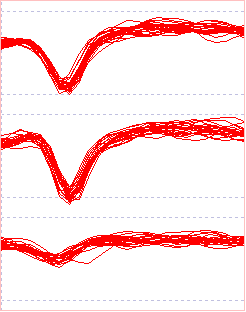

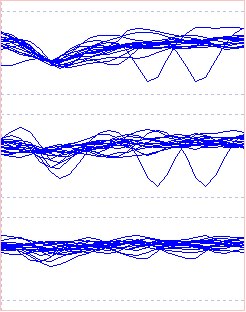
Note that when the clusters are superimposed, the waveforms of the red and blue clusters in trace 1 are virtually indistinguishable. If that was all the information available (i.e. a single electrode rather than a 3-trode recording) we would not know that there were at least 2 different large-spike axons. However, when we consider all 3 taces, the red cluster has large spikes in traces 1 and 3, and smaller but still well-defined spikes in trace 2 whereas the blue cluster has large spikes in traces 1 and 2, and smaller and less well-defined spikes in trace 3. The red and blue clusters therefore originate from separate axons. The cyan cluster has small spike-like waveforms in most sweeps in trace 1, but there are some sweeps that might just be noise. Trace 2 has even fewer spike-like waveforms, and trace 3 really does not show any spikes at all.
- A clearer view of potential spikes in the cyan cluster can be obtained by clicking the 'Heat' plot button near the bottom left of the Scope view to open the Density ('Heat') Plot dialog, and scanning through Traces 1 - 3.
The sort of axon-electrode spatial relationship that could produce the red and blue clusters in this recording is shown below. (Remember that the numbering of the elecrodes is arbitrary and reflects the trace ordering in the recording, not the spatial organization of the electrodes.)
| Ax B | Ax A | |||
| E 2 | E 1 | E 3 |
Caveats
The recording used for this tutorial is particularly "nice" because it contains spikes from 2 axons that are large but indistinguishable from each other in trace 1, while one produces a large spike in trace 2 but not trace 3 and the other produces a large spike in trace 3 but not trace 2. This means that they can be separated from each other with a single spike-detection procedure using trace 1 as a master trace. However, it is not always so simple. It could easily be the case that there was another axon that produced a prominent spike in trace 2 and/or 3, but no spike in trace 1. This would not be picked up by the single analysis described above. In such a case it would be necessary to detect spikes in trace separately, and then merge events from spikes common to multiple traces.